Does iPhone Have an Equalizer? Where to Find It
iPhone has equalizers, but not one for the whole phone. There's an EQ for the Music app (Settings › Apps › Music › EQ), a custom Equalizer for supported AirPods, tone controls for supported headphones in Accessibility › Audio & Visual › Headphone Accommodations, and an equalizer inside Spotify. No iOS setting changes every app at once, so for your own songs and files you'll need an equalizer app such as EQfy - Louder Volume, which shapes the audio it plays itself.
Where the iPhone equalizers are
| Equalizer | What it changes | Where to find it |
|---|---|---|
| Music app EQ | Songs played in the Music app | Settings › Apps › Music › EQ |
| AirPods Equalizer | Supported AirPods, in any app | Settings › your AirPods › Audio & Routing › Equalizer |
| Headphone Accommodations | Tone and soft sounds on supported headphones | Settings › Accessibility › Audio & Visual › Headphone Accommodations |
| Spotify EQ | Only Spotify | In Spotify's playback settings |
| An equalizer app | Songs played inside that app | The app's player |
The Music app's EQ
Apple's iPhone User Guide says you can change the way music sounds in the Music app with EQ and Sound Check:
- Open Settings and tap Apps, then Music.
- Tap EQ and choose a setting.
It's a list of presets, such as Bass Booster, Bass Reducer and Treble Reducer, not sliders. There's no way to set your own curve, and it changes only the Music app. To switch it off, choose Off (Apple describes this in its headphone audio article). If your music sounds quiet or thin, a reducer preset may be the cause. Our EQ settings guide covers which presets help.
The AirPods Equalizer
With supported AirPods you can go to Settings, tap your AirPods, then Audio & Routing › Equalizer and choose Custom to get Low, Mid and High sliders. Apple says the settings are stored on the AirPods rather than in an app, which makes it the closest thing to a system equalizer. Apple lists it for newer models only, and the details are in our guide to getting more bass on AirPods, with Apple's AirPods guide as the source.
Headphone Accommodations
Apple's article describes Headphone Accommodations as a way to amplify soft sounds and adjust certain frequencies for your hearing needs, for supported headphones including AirPods (2nd generation and later), AirPods Pro, AirPods Max and some Beats models. Go to Settings › Accessibility › Audio & Visual › Headphone Accommodations, turn it on, then choose whether it applies to phone calls, to media, or both. It has a Customize Audio flow with audio samples, plus manual tone options.
It's an accessibility feature, not a music EQ, so it won't give you a bass slider. If you enable Hearing Assistance on AirPods Pro 2 or 3, Apple says it overrides these settings. We explain how it affects loudness in how to make AirPods louder.
Spotify and other apps
Streaming apps keep their own equalizers. Spotify has one in its playback settings, covered in our Spotify guide. Changing the Music app's EQ does nothing in Spotify, and changing Spotify's does nothing in Music, which is why songs can sound different from app to app.
Why there's no equalizer for everything
iOS lets an app process only the audio that it plays itself. An equalizer app can't reach into Spotify, YouTube or the Music app's streaming and reshape their sound, and that's also why no "system-wide equalizer" app can exist on a normal iPhone. The same rule is why songs from an Apple Music subscription, which are protected, can't be processed by third-party apps at all.
Adding an equalizer with an app
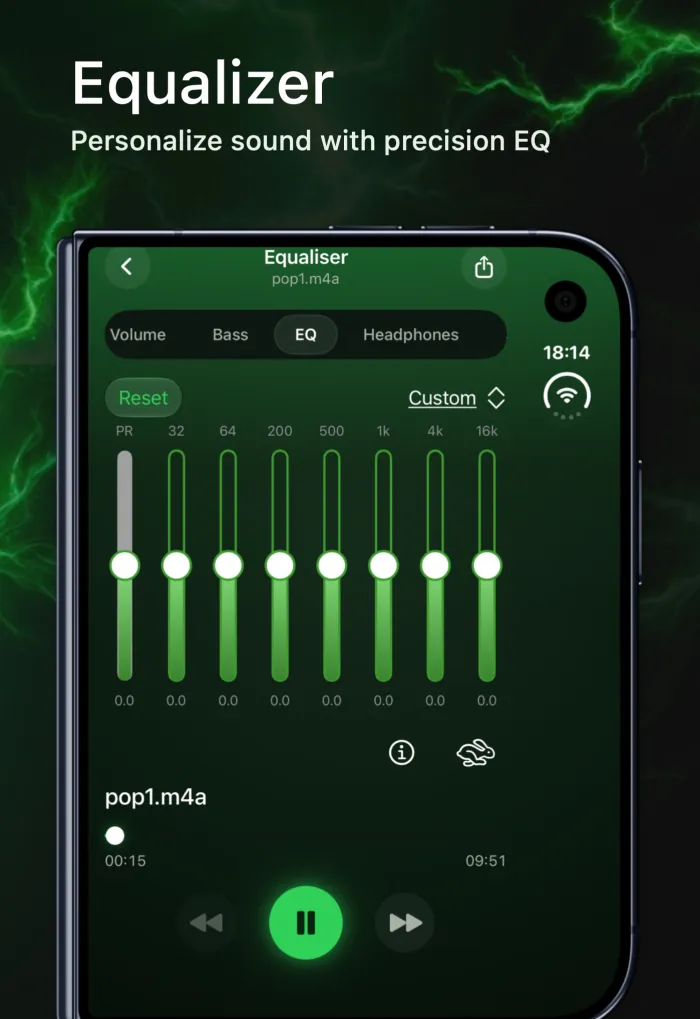
For songs and audio files you own, an equalizer app fills the gap. In EQfy - Louder Volume, the Equalizer tab of the player has 7 bands (32 Hz, 64 Hz, 200 Hz, 500 Hz, 1 kHz, 4 kHz and 16 kHz) plus a preamp, 9 presets (Rock, Jazz, Electronic, Classical, Reggae, Rap, R&B, Dance and Acoustic) and a Reset button. The equalizer is part of Premium, and the app is free to download. It can't save your own presets, so write down a setting you like.
Other apps have more bands or different features, and we compare them in the best equalizer apps for iPhone. If you want a starting point, use our EQ settings by genre.
Which one should you use?
- Listening in Apple Music: try the Music app's EQ presets first.
- Using supported AirPods: the AirPods Equalizer works in every app.
- Listening in Spotify: use Spotify's own equalizer.
- Playing your own MP3s and files: use an equalizer app such as EQfy.
- Hearing-related needs: use Headphone Accommodations and talk to a hearing professional.
Frequently asked questions
Does iPhone have a built-in equalizer?
Yes, but in specific places rather than for the whole phone. The Music app has EQ presets (Settings › Apps › Music › EQ), supported AirPods have an Equalizer, and Headphone Accommodations adjusts tone for supported headphones. There is no single equalizer that changes every app.
Is there a system-wide equalizer for iPhone?
Not in iOS Settings. iOS lets an app process only the audio it plays itself, so an equalizer app can shape its own songs but not Spotify, YouTube or Apple Music. Headphone Accommodations is the closest thing at the system level, for supported headphones.
How do I turn off the equalizer on iPhone?
For the Music app, go to Settings › Apps › Music › EQ and choose Off, as Apple's support page describes. For AirPods, open Audio & Routing › Equalizer and choose Recommended. Spotify and other apps have their own switches.
Does the Apple Music EQ change Spotify or YouTube?
No. The EQ in Settings › Apps › Music only affects the Music app. Spotify has its own equalizer in its playback settings, and our Spotify guide shows how to find it.