Best Equalizer Apps for iPhone, Compared
The best equalizer app for iPhone depends on how much control you want. Boom has the most detailed equalizer, with 8 or 16 bands and 29 presets. EQfy - Louder Volume and Equalizer Fx have 7 bands, which is enough to fix bass, vocals and treble. Apple's built-in EQ in the Music app is free but only offers presets. Every equalizer app, built in or not, works on the audio it plays itself, not on Spotify or YouTube.
We make EQfy, so this comparison sticks to facts you can check. App details come from each app's US App Store listing and Apple's iPhone User Guide, and ratings and features are as of October 21, 2026. Where another app is stronger than ours, we say so.
The equalizers at a glance
| App | Bands and presets | Custom presets | Price model (per its listing) | US rating, Oct 2026 |
|---|---|---|---|---|
| Apple Music EQ (built in) | Presets only, no bands to adjust | No | Free, Music app only | – |
| EQfy - Louder Volume | 7 bands (32 Hz–16 kHz) + preamp, 9 presets | Not saved yet | Free download; the EQ is part of Premium | 4.5 (40 ratings) |
| Boom: Bass Booster & Equalizer | 8 or 16 bands, 29 presets, Headphone EQ for 5,000+ models | Yes | 7-day trial, then subscription | 3.9 (4,500+ ratings) |
| Equalizer Fx: Bass Booster App | 7 bands, more than 15 presets | Yes | Monthly or yearly subscription | 4.2 (28,000 ratings) |
| Equalizer+ HD music player | 7 bands, 10 genre presets | Yes | Free, with a Pro subscription for features such as the bass booster | 3.8 (9,400 ratings) |
Apple Music's built-in EQ: free, but presets only
Before you install anything, know that your iPhone already has an equalizer. According to Apple's iPhone User Guide, you pick a preset such as Bass Booster or Vocal Booster in the Music settings. You can't move individual bands, and it only affects the Music app. It is a good first try. If you want to tune the sound yourself, or EQ songs outside Apple Music, you need an app.
EQfy - Louder Volume: 7 bands plus a preamp
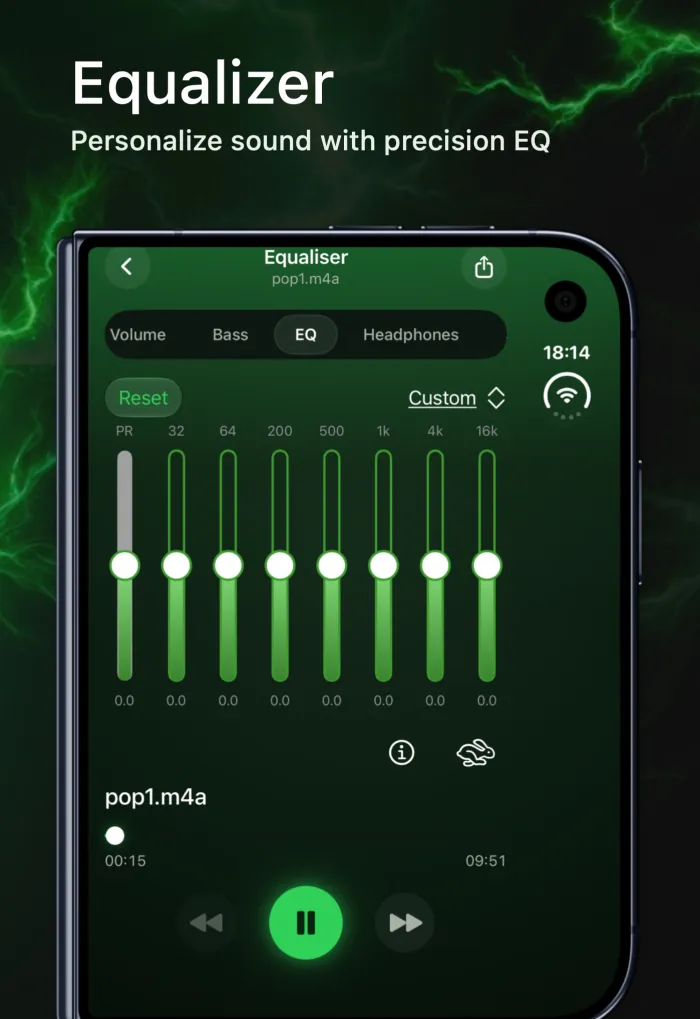
EQfy's equalizer has bands at 32 Hz, 64 Hz, 200 Hz, 500 Hz, 1 kHz, 4 kHz and 16 kHz, a preamp, and nine genre presets: Rock, Jazz, Electronic, Classical, Reggae, Rap, R&B, Dance and Acoustic. It covers the jobs most people need: more sub-bass, cleaner vocals, brighter treble. It sits next to a free Volume Boost dial, so you can raise the level and shape the sound in the same player. The exact value of every preset is in our EQ settings guide.
Two honest limits. EQfy doesn't save custom presets yet, so your slider changes aren't kept between launches. And the equalizer is part of Premium, while Volume Boost and the player are free.
Boom: the most detailed equalizer
If detail is your priority, Boom is the strongest option here. Its listing describes an 8- or 16-band custom equalizer, 29 presets, and a Headphone EQ that tunes the sound for more than 5,000 headphone models. It also streams TIDAL, radio stations and podcasts. The trade-off is a 7-day trial followed by a subscription, and more to learn. We compare the two apps in EQfy vs Boom.
Equalizer Fx: preset-focused, with custom presets
Equalizer Fx, from TwinBit, has the largest user base in this list. Its listing describes a 7-band EQ, more than 15 presets (Acoustic, Bass Booster, Bass Reducer, Flat, Classical, Hip Hop, Rock, Latin, Pop and more) and the ability to create your own presets. Full access needs a monthly or yearly subscription. The listing also warns that effects can't be applied to protected Apple Music tracks, which is the same iOS limit every app has.
Equalizer+ HD: a classic with custom presets
Equalizer+ HD music player from MWM is a long-running player with a 7-band equalizer and ten genre presets (Flat, Pop, Rock, Electro, Dance, R&B, Hip hop, Jazz, Acoustic and Classical). According to its listing, you can save and edit your own presets, and the Pro subscription adds features such as the bass booster. It's also the oldest here: the listing was last updated in August 2024, so check that it works with your iOS version.
Which one should you pick?
- You only use Apple Music and want a quick change: try Apple's built-in EQ first.
- You want the finest control and headphone profiles: Boom.
- You want a simple 7-band EQ next to a free volume boost: EQfy.
- You want to save your own presets: Equalizer Fx or Equalizer+ HD.
Whichever you choose, start with a preset, then change only one band at a time. If you mostly want more low end, the guide to boosting bass on iPhone speakers shows which settings matter most on a small speaker.
Frequently asked questions
What is the best equalizer app for iPhone?
It depends on how much control you want. Boom has the most detailed one, with an 8- or 16-band EQ and 29 presets. EQfy and Equalizer Fx have 7 bands, which is enough for bass, vocals and treble. Apple Music's built-in EQ is free but offers presets only.
Does the iPhone have a built-in equalizer?
Yes, but only for Apple's Music app. You pick a preset in the Music settings and can't adjust individual bands. It doesn't change Spotify, YouTube or other apps.
Can an equalizer app change the sound of Spotify or YouTube?
No. iOS only lets an app process the audio it plays itself, so equalizer apps work on the songs you play inside them. Songs from an Apple Music subscription are protected and can't be processed by third-party apps.
How many EQ bands do I need?
Seven bands are enough for most listening: sub-bass, bass, low mids, mids, upper mids, treble and air. More bands, such as Boom's 16, give finer control, but they take longer to set up. See our EQ settings guide for ready-made values.