Best Bass Booster Apps for iPhone, Compared
The best bass booster app for iPhone depends on what else you want from it. Boom has the most features, Equalizer Fx has the biggest user base and custom presets, and the "Bass Booster" apps from Companjen and AppRover are simpler apps built around bass boosting. EQfy - Louder Volume is free to start, with Bass Boost in Premium. For a free test, Apple's Music app already has a Bass Booster preset. Every one of them only changes the audio it plays itself, not Spotify or YouTube.
We make EQfy, so we've kept this to facts you can check. App details come from each app's US App Store listing, and ratings and features are as of October 23, 2026. Where another app does more than ours, we say so.
One limit every bass booster app shares
iOS lets an app process only the audio it plays itself. That means none of these apps can add bass to Spotify, YouTube or Apple Music streaming, and songs from an Apple Music subscription are protected, so they can't be processed either. Equalizer Fx's listing says the same about protected music. If you mostly use streaming apps, a bass booster won't help; use the apps' own equalizers instead, covered below.
Bass booster apps at a glance
| App | Bass and EQ tools (per its listing) | Price model | US rating, Oct 2026 |
|---|---|---|---|
| EQfy - Louder Volume | Bass Boost dial up to +12 dB (low shelf near 200 Hz), 7-band EQ with 9 presets, 3D Audio, free Volume Boost | Free download. Bass Boost and the EQ are in Premium | 4.5 (40 ratings) |
| Boom: Bass Booster & Equalizer | Bass booster, 8- or 16-band EQ, 29 presets, Headphone EQ for 5,000+ models, 3D surround | 7-day trial, then subscription | 3.9 (4,500+ ratings) |
| Equalizer Fx: Bass Booster App | Bass boosting effects, 7-band EQ, 15+ presets, custom presets | Monthly or yearly subscription for full functionality | 4.2 (28,000 ratings) |
| Bass Booster Volume Boost EQ (Companjen Apps) | Bass booster, 10-band EQ with 20+ presets, music player with cloud import | Free download; the listing doesn't describe paid features | 4.4 (19,000 ratings) |
| Bass Booster Volume Power Amp (AppRover) | One-tap bass booster, plus flanger and pitch effects | Free download; a Pro subscription unlocks all effects and unlimited bass boosting | 4.3 (18,000 ratings) |
Ratings are the US App Store averages from each listing, rounded. Prices vary by country and change, so check the listing before you subscribe.
Free bass boost without an app
Before installing anything, try the built-in options:
- Apple Music's Bass Booster preset. Go to Settings › Apps › Music › EQ and choose Bass Booster (the path follows Apple's iPhone User Guide). It's free, but it's a fixed preset with no strength control, and it only affects the Music app.
- Spotify's equalizer. Spotify's help page says it adjusts the bass and treble in music and podcasts. It only affects Spotify, and the settings you see can vary.
Our guide to boosting bass on iPhone speakers and headphones walks through both, plus how to get more bass before boosting anything.
Boom: the most features
Boom's listing advertises a bass booster, an 8- or 16-band equalizer, 29 presets, 3D surround sound and a Headphone EQ for more than 5,000 headphone models. It also streams TIDAL, radio stations and podcasts. If you want the deepest set of controls, Boom is the strongest pick here. The trade-offs are a 7-day trial followed by a subscription, and a lower average rating than the others. Our direct comparison is EQfy vs Boom.
Equalizer Fx: biggest user base, custom presets
Equalizer Fx from TwinBit has the most ratings in this group. Its listing describes bass-boosting effects, a 7-band EQ and more than 15 presets, including Bass Booster and Bass Reducer, and lets you create your own presets. The listing says the full feature set needs a monthly or yearly subscription.
Bass Booster Volume Boost EQ: a full music player
This app from Companjen Apps is more music player than tool. Its listing describes a bass booster, a 10-band equalizer with more than 20 presets, access to your iTunes library and to files in Dropbox, Google Drive, OneDrive, iCloud Drive and by Wi-Fi transfer, plus an offline mode. The listing doesn't say which features are paid, so check what's unlocked after you install.
Bass Booster Volume Power Amp: one-tap simplicity
AppRover's app keeps it simple: a speaker icon raises the bass, and optional flanger and pitch effects change the sound. Its listing says a Pro subscription unlocks all effects and unlimited bass-boost use. There's no full equalizer to shape the sound, so it suits people who just want more thump.
EQfy: free to start, bass in Premium
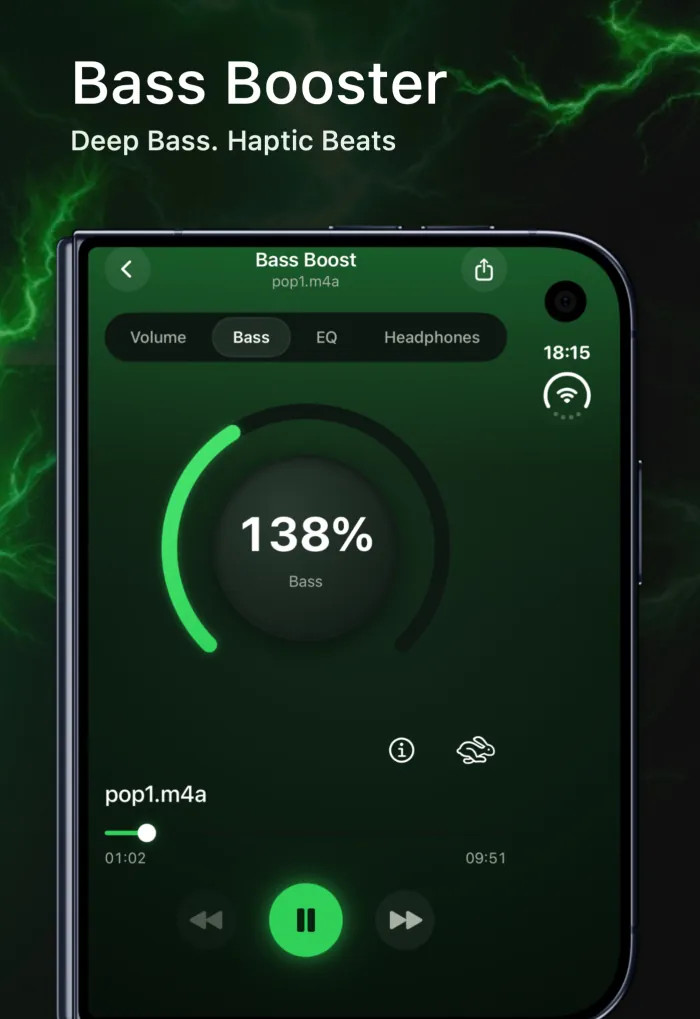
EQfy's Bass Boost raises a low-shelf filter centred around 200 Hz by up to +12 dB, the range iPhone speakers can actually reproduce. It sits next to a 7-band equalizer with a preamp and 9 presets, 3D Audio and a free Volume Boost that goes up to +12 dB. The music library, imports from Files and offline playback are free; Bass Boost, the equalizer and 3D Audio are part of Premium.
It has limits, too. Its EQ is less detailed than Boom's or Companjen's, it can't save custom presets, it has no TIDAL or radio streaming, and with 40 ratings it's the new name in this list. Our post on the best equalizer apps for iPhone compares the EQ side in more detail, and the best volume booster apps covers loudness.
For headphones, AirPods or a Bluetooth speaker
All of these apps work the same way whatever you listen on: they change the signal before it leaves the iPhone. Bass is easier to notice on headphones, because small speakers can't physically move much air at low frequencies. On a Bluetooth speaker, the boost only applies to music played inside the bass booster app, and the speaker's own limits still apply. If it sounds quiet rather than weak, see why iPhone Bluetooth volume is low, and for earbuds try more bass on AirPods.
Which one should you pick?
- You want the most control and headphone profiles: Boom.
- You want custom presets and an established app: Equalizer Fx.
- You want a 10-band EQ in a cloud-friendly player: Bass Booster Volume Boost EQ.
- You want a one-tap bass effect: Bass Booster Volume Power Amp.
- You want a free loudness boost plus bass, EQ and 3D tools in one simple player: EQfy.
- You only listen in Apple Music: try its free Bass Booster preset first.
Whichever you choose, raise bass in small steps. Heavy boosts can distort at high volume, which is hard on tiny speakers and on your ears. For safe levels, read is volume boosting safe?, and for starting values, best EQ settings for iPhone.
Frequently asked questions
What is the best free bass booster for iPhone?
The quickest free option is the Bass Booster preset in Apple's Music app (Settings › Apps › Music › EQ), but it only changes the Music app. Bass booster apps are free to download, though many keep their full feature set behind a subscription, so check each listing.
Does a bass booster app work with Spotify or YouTube?
No. iOS only lets an app process audio that it plays itself, so a bass booster can't change Spotify, YouTube or Apple Music streaming. Spotify has its own equalizer for bass and treble, and Apple's Music app has its EQ presets.
Is EQfy's bass booster free?
EQfy is free to download and its Volume Boost is free, but Bass Boost is part of the optional Premium subscription. It adds up to +12 dB with a low-shelf boost centred around 200 Hz, on songs and files you play inside EQfy.
Can a bass booster damage my speakers or headphones?
Too much bass at high volume can distort, and that is hard on small speakers and on your ears. Raise the boost in small steps, stop when it sounds harsh, and read is a volume booster safe?