iPhone Mono Audio: What It Does and When to Use It
iPhone Mono Audio mixes the left and right channels together and plays that one mix in both ears. Turn it on in Settings › Accessibility › Audio & Visual › Mono Audio if you listen with one earbud or hear better in one ear. Leave it off otherwise: stereo sounds wider, and on AirPods Mono Audio blocks Spatial Audio.
What does Mono Audio do on iPhone?
Most music is mixed in stereo. The engineer places each sound somewhere between your left and right ear: a guitar a little to the left, a shaker far to the right, the vocal in the middle. Your headphones play two different signals, and that difference is what makes a mix sound wide.
Mono Audio throws that placement away. iOS adds the two channels together and sends the same signal to both sides. Apple's AirPods guide says Mono Audio plays "the same content in both ears." With a single earbud in, you now hear the instruments that were panned to the other side. Extra-wide reverb and some stereo effects can thin out when the channels are summed. Normal instruments and vocals survive. Anything mixed out of phase, which some stereo-widening effects do, can cancel out.
Early Beatles stereo mixes show it best: on many tracks of Please Please Me, most of the band sits in one channel and the vocals in the other. In one earbud you'd get half the song. Modern pop is safer, but plenty of tracks still pan backing vocals, guitars or sound effects hard to one side.
How to turn Mono Audio on or off on iPhone
- Open Settings.
- Tap Accessibility.
- Tap Audio & Visual. Some older versions label it Audio/Visual, and before iOS 13 the switch sat under General › Accessibility.
- Turn Mono Audio on or off.
The switch applies to the whole phone: the speaker, wired headphones, AirPods and other Bluetooth earbuds, in every app. Balance and Headphone Accommodations are on the same screen (Apple's iPhone User Guide covers all three).
To hear the difference, play a song you know well with both earbuds in and flip the switch while it plays. In mono the sound collapses into the middle of your head. Flip it back and the instruments spread out again.
Mono Audio on or off: when each makes sense
| Your situation | Mono Audio | Why |
|---|---|---|
| One earbud in, to hear traffic or the office | On (optional with one AirPod) | You'd otherwise miss whatever is panned to the other side |
| Sharing earbuds with someone | On | Each person gets the whole song, not half of it |
| One ear hears less than the other | On | Nothing in the song plays only in your weaker ear |
| Two earbuds, normal hearing, music or films | Off | Stereo gives you width and separation |
| Listening on the iPhone speaker | Either | Phone speakers give less stereo width than headphones, and iPhones before the iPhone 7 have one speaker anyway |
It's easy to leave on by accident: you switch it on for one earbud, forget, and months later blame your new headphones for sounding flat. If music suddenly feels narrow, this switch is worth checking before you blame the headphones or touch the EQ.
Mono Audio with AirPods
With one AirPod you may not need the setting at all. MacRumors' guide to using a single AirPod says that with only the left or right AirPod in, stereo is converted to mono automatically. Mono Audio is still worth turning on if you use one earbud from another brand, or if both AirPods are in and one ear hears less.
The cost on AirPods is Spatial Audio. Apple's AirPods guide says that when you use Mono Audio, "you can't use Spatial Audio and head tracking." If Spatial Audio has stopped working on your AirPods, check this switch first. Once mono is off, our guide to what spatial audio is on iPhone covers what it adds.
iPad has the same switch in the same place. Apple Watch and Mac each have their own, and the iPhone setting doesn't carry over. From the AirPods guide:
- Apple Watch: Settings › Accessibility, then Mono Audio under Hearing.
- Mac: System Settings › Accessibility › Audio, then turn on "Play stereo audio as mono."
If your AirPods sound mono on the Mac but stereo on the iPhone, that's why.
iPhone Mono Audio vs Balance
Mono Audio decides what each ear receives: the full mix on both sides. Balance decides how loud each side is. Drag it toward the left and iOS turns the right side down, which shifts the sound toward your left ear. If your left ear is weaker, turn on Mono Audio so nothing plays only on that side, then nudge Balance left until both ears sound even.
Neither one makes a weak earbud louder when the earbud itself is the problem. If one AirPod is quieter with Balance centered, the cause is usually wax on the mesh, a loose fit or a connection glitch. Those checks are in the one AirPod louder than the other guide.
If one ear has been quieter with every pair of headphones you try, see a doctor or hearing professional. If the change came on suddenly, go the same day. Mono Audio works around the difference but won't tell you why it's there. Apple's Headphone Accommodations, on the same Audio & Visual screen, can also tune the sound for your hearing with supported headphones.
Does mono audio make it louder?
Not overall. It isn't a volume control. What people notice with one earbud is that the song fills in: the guitar or backing vocal that lived only in the other channel is now in their ear too, so the track sounds fuller.
If the sound is simply too quiet, Mono Audio won't fix that. Check the volume limits and the other settings in our guide to iPhone volume being too low, or for AirPods specifically, how to make AirPods louder.
Mono Audio and EQfy
EQfy - Louder Volume has no mono switch of its own. The iOS setting covers EQfy like every other app.
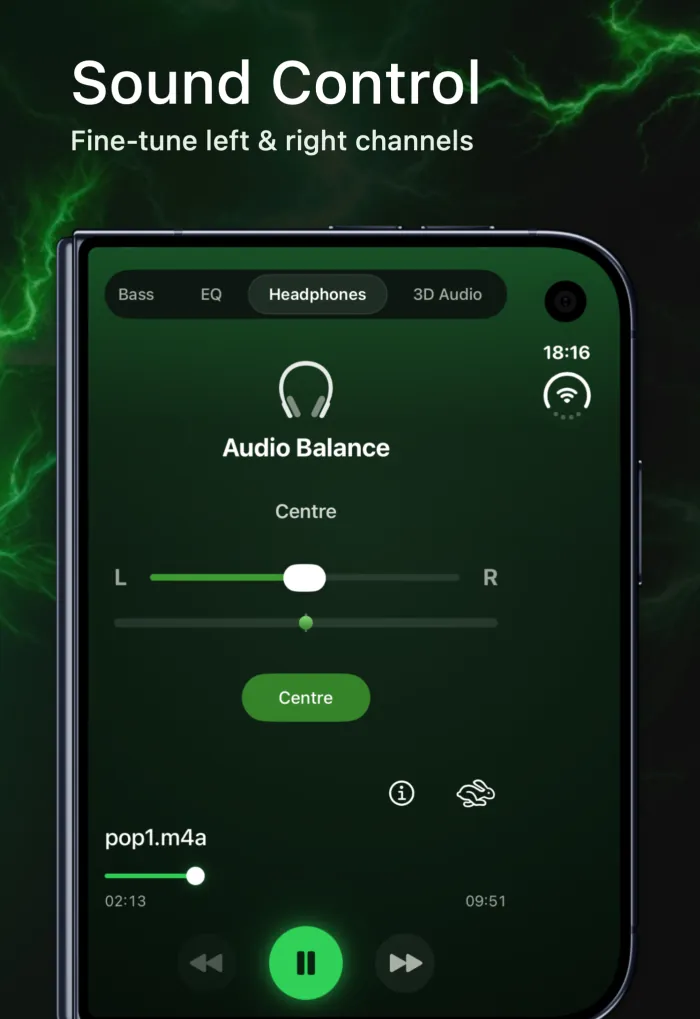
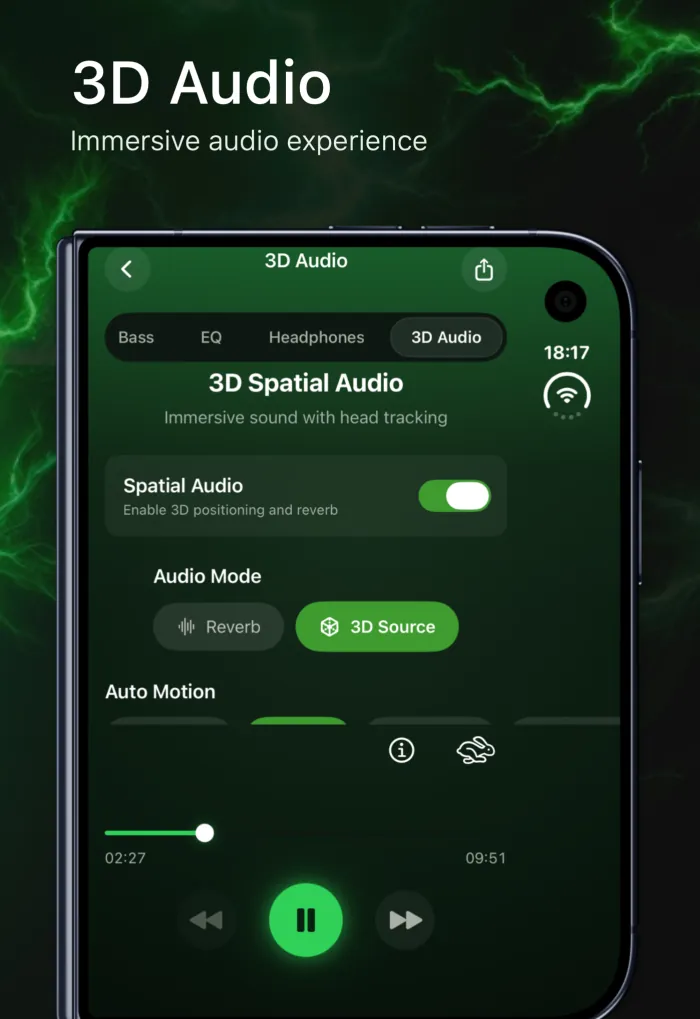
One EQfy tool clashes with mono: 3D Audio moves sound around your head, and Mono Audio flattens that back into the middle. Turn Mono Audio off before you try it. The Headphones tab also has an Audio Balance slider for music you play in EQfy; if you adjust balance there, keep the iOS Balance slider centered so you only change it in one place. Both tools are part of Premium and only affect audio played inside EQfy, not Spotify, YouTube or calls. The sound control overview shows each one.
If your real problem is a quiet recording, EQfy's free Volume Boost dial goes from 100% to 200%, up to +12 dB, for songs and files you play in the app. Apple Music subscription tracks are protected and can't be boosted. EQfy is free to download; on the App Store it's listed as Volume Booster Sound Amplifier. It isn't a hearing aid.
Frequently asked questions
Should Mono Audio be on or off on iPhone?
Off, unless you listen with one earbud, hear better in one ear, or share a pair of earbuds. With two working earbuds and normal hearing, stereo gives you the full mix and lets you use Spatial Audio.
Does mono audio make it louder?
Not overall. It doesn't raise the volume. With one earbud in, it can seem louder because you now hear the parts of the song that were only in the other channel.
Do I need Mono Audio to use one AirPod?
Usually not. MacRumors notes that a single AirPod already converts stereo to mono on its own. Mono Audio is still useful with other earbuds, and when both AirPods are in but one ear hears less.
Why is Spatial Audio not working on my AirPods?
Check Mono Audio first. Apple's AirPods guide says that when you use Mono Audio, you can't use Spatial Audio and head tracking. Turn it off in Settings › Accessibility › Audio & Visual.